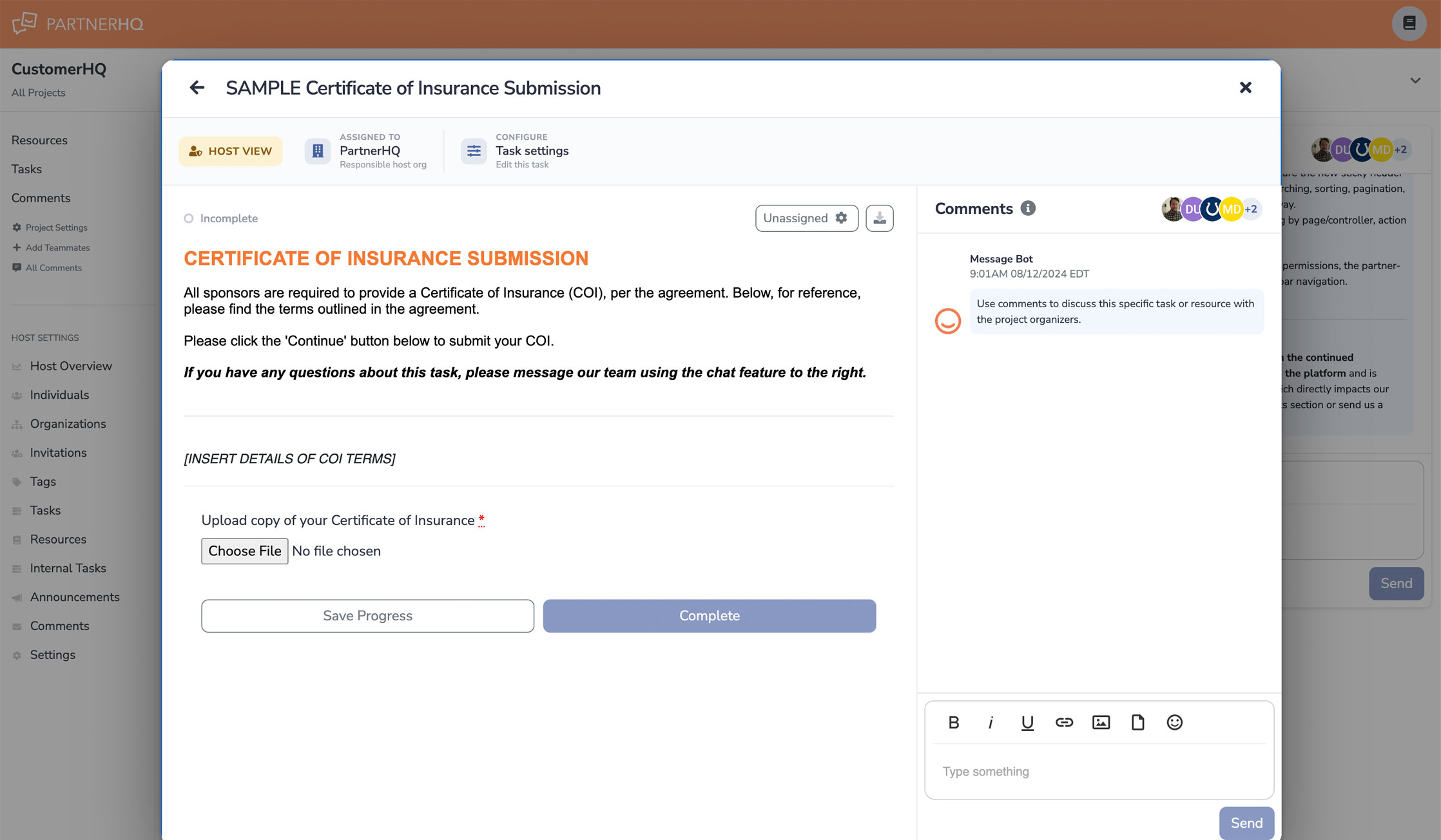
Headline Features
A New In-Window Experience for Tasks & Resources: We've reimagined how partners and hosts work through their assignments. Instead of navigating away to a separate page, tasks, resources, and internal tasks now open in a window directly over your dashboard—keeping you in context, removing full page reloads, and making it faster and smoother to move through your work.
Task Calendar View: Tasks can now be viewed on a calendar in addition to the previous list view — a date-based, at-a-glance picture of what's assigned and what's coming due, so nothing slips through the cracks.
Timezone Support: Projects now carry a timezone, so due dates, assignment times, and activity display correctly for every host and partner no matter where they're located. The guesswork (and the off-by-a-few-hours confusion) is gone.
Announcement Email Preview & Test-Send: When composing an announcement, you can now preview the exact email your recipients will receive and Send a test to your own inbox — both using your current draft, before anything goes out. Send with confidence.
⚡ A Platform-Wide Performance Overhaul
We rebuilt the slowest performing pages across the host experience. Not a small task, but the result: you should see noticeably faster load times across the platform, most dramatically on large projects. Pages like Individuals, Organizations, Comments, Tasks, Resources, the task results grid and detail tabs, the Project Overview, Activity, Invitations, and the Donations export are all significantly quicker, and several screens that used to take a few seconds now load in a fraction of one.
Fundraising
Donation Filtering on the Nonprofits Tab: Filter the donations list by the criteria that matter so you can quickly find and act on the right contributions.
Improved Fundraising Page Sharing: A cleaner, more reliable experience when sharing your fundraising page.
Guided Fundraising Setup: A new first-time experience on the fundraising overview tab walks you through getting started.
Lists, Filters & Navigation
Filters Now Persist: Your filters stay applied as you move around index pages instead of resetting — your view is where you left it.
Rows-Per-Page Remembered: The number of rows you choose to display is now retained across list pages.
Improved Sorting & Consistent Breadcrumbs: Better sorting behavior on list pages and standardized breadcrumbs for predictable navigation everywhere.
Rebuilt Resource Reorder Page & Clearer Draft Badges: A smoother drag-to-reorder experience for resources, and clearer at-a-glance draft/published status indicators.
New "Upcoming With No Activity" Task Filter: Instantly surface tasks due in the next two weeks that have had no partner activity — the same insight that used to live on the separate Intelligence page, now built right into your task list where you work.
Task Management
"Why Is This Locked?" Explanations: Locked tasks now tell you exactly why they're locked — a completed parent task, the task itself, or a linked internal task — with clear, role-aware guidance (actionable steps for hosts, simpler pointers for partners).
Per-PDF Display Toggle: For PDFs embedded in tasks and resources, choose whether each one renders inline or appears as a simple link — per PDF, so you control the reading experience.
Exports
More in Your Exports: Task exports now include the task description and completion information, and you can add users to custom exports — so the data you pull out matches the data you need.
Email & Communication
Better Email Rendering: Announcement and notification emails now render more cleanly and consistently across inboxes.
Email-Tracking Controls: A new project setting lets you turn off email tracking, along with finer control over invitation reply routing.
Individuals & Invitations
Invitation Link on the Individual Page: A person's invitation link is now available right on their page for quick access and resending.
Stronger Email Validation: Catch typos and invalid addresses earlier when adding people.
Streamlined Navigation
Fewer, Clearer Destinations: The standalone host page and the Intelligence page have been consolidated into the Overview and Tasks pages — the same information, simplified.
For Technical Teams (API)
API Parity, Phase 1: We've added 12 new partner-facing API endpoints — chat channels and messages, invitations, uploads, and profile — so more of what your team does in the dashboard can now be automated via the API.